


ZEvents Invite Maker Hobnob
4.52.23K Reviews
App Specs
- Version
- 4.3.17
- Updated On
- License
- Free
- Downloads
- 500,000+
- Developer
- Zazzle
- Categories
- Events
- Platform
- Android, iOS
Screenshots
 Analysis by AppCompare
When I’m organizing an event, I want to spend more time thinking about the people and less time chasing replies across several chats. That is the appeal of Hobnob - Invitation Card Maker: it brings invitation-making and guest coordination into a single event-focused app. It is free to download, and I find its text-first approach especially practical for birthdays, weddings, graduations, baby showers, and other occasions where a clear invitation matters as much as a polished design.
A quick start, with a little planning
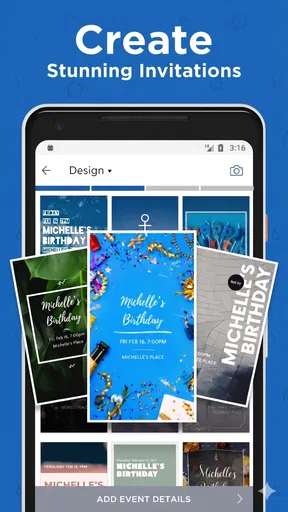
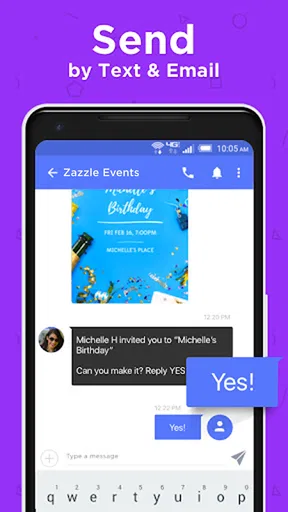
The first useful question is whether Hobnob suits the way you already organize. If your guest list is comfortable receiving an invitation by text or email, the app gives you a more deliberate alternative to typing the same details into separate messages. You can choose a visual style, add the event information, and send invitations without needing to make a design from scratch. That is a good fit when you want something more personal than a plain group text but do not want to spend an evening learning a full graphic-design tool.
I would still prepare the basics before opening the invitation editor: confirm the time, location, and wording, and decide whether guests need to bring anything. That small step helps avoid correcting details after people have already replied. For an event with several moving parts, I would also keep a separate note of decisions that do not belong on an invitation, such as who is bringing food or who needs a lift. The app’s strength is event communication, not replacing every planning tool in your life.
Where its event workflow helps most
Hobnob is most appealing when an event has a defined guest list and a straightforward invitation. A family birthday, a graduation get-together, or a baby shower can all benefit from having the date and venue presented consistently rather than buried in a conversation. For weddings or larger gatherings, it can help with sending an invitation and keeping an eye on replies, though I would not assume that an invitation app alone will cover every detail of a complex event.
A realistic example: imagine you are arranging a casual birthday dinner and need to invite relatives and friends who do not all know one another. A designed card makes the occasion feel intentional, while direct responses give you a clearer sense of attendance than a string of “maybe” messages. Once people answer, you can use that information when checking the table size or planning food. The practical benefit is not that the app makes the decisions for you; it is that the invitation and the response stay connected to the same event.
One useful habit is to make the invitation easy to scan. Put the date, start time, and location where guests can quickly find them, and keep any extra explanation short. A playful design can set the mood, but decorative choices should not make essential details hard to read. If guests need directions, accessibility information, or a specific arrival instruction, make that clear in the event communication rather than hoping everyone will ask later.
Choosing between a card, a chat, and a planning tool
Compared with a group chat, Hobnob offers a more organized invitation and a clearer way to gather responses. A chat is still the easier choice for a spontaneous plan among a few friends, particularly when the details are likely to change. For a planned celebration, though, a dedicated invitation can feel less chaotic and helps prevent key information from disappearing under unrelated messages.
Worth Reading Before You Choose

EA SPORTS FC Mobile 26 Is a Bigger Football Game, but It Takes Time

Flipboard Shows What News Apps Must Do Beyond the Feed

Switching to Android Auto Means Rethinking Your Driving Routine

Google Calendar Makes a Crowded Week Easier to Manage

Ludo King Makes the Most of the Minutes Between Plans

Baby Panda World Brings Quick Play to Modern Phones, but Its Game Library Feels Busy
Compared with making a card in a general design app, the attraction here is the event-oriented process: you are not only creating an image but also coordinating the invitation and responses. A design app may be preferable if you need unusually precise visual control or want a file for printing. Hobnob makes more sense when the finished invitation is meant to be sent digitally and guest replies are part of the job.
There is a similar trade-off with full event-planning services. Those can be a better match for intricate schedules, vendor coordination, or a large guest-management workload. Hobnob feels more suited to the moment when you need a good-looking invitation and a manageable way to hear back. I would choose it for a personal celebration, not as a substitute for every spreadsheet, calendar, or detailed planning system a large event may require.
Keeping the process smooth when plans change
Invitations are often sent before every detail is settled, so I recommend checking the event information once more before sending. If the time or venue changes later, do not rely on guests remembering a casual message from days ago; make the correction clear and easy to spot. It is also sensible to think about who may not use text or email regularly. For those guests, a direct call or another familiar method can be a helpful backup rather than assuming one channel reaches everyone.
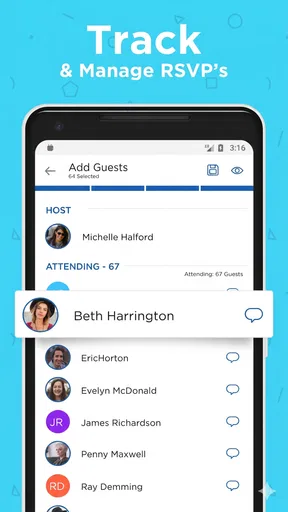
RSVP tracking is most valuable when you make a habit of checking it at useful decision points. For example, review replies before confirming food quantities, then check again closer to the event if late answers could affect your plans. That approach turns responses into something actionable instead of treating them as a running tally you only glance at once. If a guest has not replied, a polite personal follow-up may still be more reliable than sending repeated reminders to everyone.
Speed expectations and busy moments
For a simple invitation, the workflow is naturally lighter than building a polished card in a full design program: you choose a style, add the event details, and prepare it for sending. How quick that feels will depend on how decisive you are about the design and how much information the event needs. I would not treat the app as a shortcut around planning; it is most efficient when you already know the essentials and are not revising the invitation repeatedly.
The busiest point is likely to be close to sending time, when you are checking names, details, and guest responses while juggling other arrangements. I find it helpful to separate those tasks: finish the invitation first, review it as if I were a guest, then send it and use replies to guide the next planning decision. This reduces avoidable edits and makes the process feel calmer. If an event changes at the last minute, a direct message to affected guests can complement the invitation workflow.
Reliability, devices, and practical limits
Hobnob is made by Zazzle and is listed as an events app, with a 4.6 average from around 6,100 ratings and more than 500,000 installs. Its current version is 4.3.15, and it is marked for Everyone. Those details suggest that it has found an audience for digital invitations, but they do not guarantee that every individual device or connection will behave identically. For an important celebration, I would keep the event details somewhere I can refer to independently and avoid leaving invitations until the last minute.
The app’s stated minimum operating-system requirement is version 7.0. If you are using an older device, checking compatibility before building an invitation is a sensible first step; if you are on a supported device, keeping the operating system and app current is a reasonable way to avoid preventable compatibility headaches. I would also consider the people receiving the invitation: a beautifully formatted message is only useful if guests can access and understand it, so a short plain-text note with the essential details can be a considerate backup.
The download is free, while in-app purchases range from $3.99 to $284.99 per item. I would begin with the available free options and decide whether a paid design is genuinely worth it for that particular event, rather than assuming a premium look is necessary. The main limitation is that creative choice can invite tinkering: if you keep adjusting colors and decorative details, a quick invitation can become a longer task. Setting a small time limit and prioritizing readability keeps the design work in proportion.
Who I would recommend it to
I would recommend Hobnob to someone who hosts occasional celebrations, wants invitations to feel more thoughtful than a plain message, and would appreciate keeping guest responses tied to the event. It is especially useful when you are inviting people across separate social circles and do not want to create a large group chat just to establish attendance. The app is also a sensible option for hosts who enjoy personalizing the look but do not want to start with a blank design canvas.
I would skip it, or use it only for the invitation, if your plans depend on detailed logistics, printed stationery, or coordination with many vendors. It may also be the wrong fit if your guests strongly prefer phone calls or another communication channel. In those situations, the best invitation method is the one your guests will actually see and answer. A digital tool should make coordination easier, not create a new hurdle for the people you are inviting.
Creating Invitations Has Never Been This Fun
First off, the interface is super intuitive. You don't need to be a tech wizard to navigate through Hobnob. Everything is laid out in a way that just makes sense. You start by selecting a theme for your event. Whether you're planning a kid’s birthday bash, a classy dinner party, or a spontaneous night out with friends, there’s a design that fits your vibe.
I was particularly impressed by the customization options. You can tweak everything from fonts and colors to adding quirky stickers and gifs that add a personal touch. It’s like having a mini graphic designer in your pocket. Plus, you can include all the essential details like the time, date, and location with ease.
Keeping Tabs on RSVPs
One of the standout features of Hobnob is the seamless RSVP tracking. No more endless group chats trying to figure out who’s coming and who’s bailing last minute. The app sends out the invites via text or email, and guests can respond directly. You get real-time updates, so you're always in the loop.
I also loved the reminders feature. A gentle nudge a day or two before the event ensures no one forgets and you’re not left munching on chips all by yourself. It's like having a personal assistant who’s got your back.
Extra Perks That Steal the Show
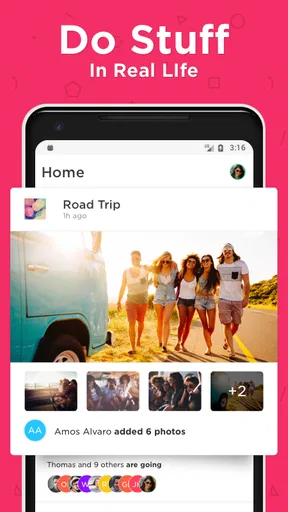
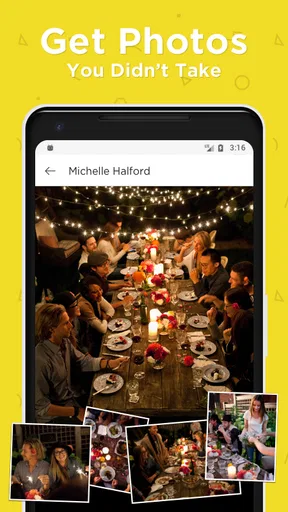
Besides creating stunning invites, Hobnob offers a photo sharing feature. After the event, guests can upload their snaps, creating a shared album of memories. It’s a lovely way to relive the night and see the party from everyone’s perspective.
Another cool thing is the app’s ability to suggest nearby venues based on the type of event you’re hosting. I found this particularly helpful when I was stumped for ideas on where to hold a surprise birthday party.
The app is free to download with some in-app purchases if you want to unlock premium designs. Honestly, even the free version offers plenty of creative freedom, which is a big plus in my book.
In a nutshell, Hobnob - Invitation Card Maker is a lifesaver for anyone planning an event. It's like having a party planner, designer, and organizer all wrapped into one convenient app. Whether you're a seasoned host or throwing your first big party, Hobnob makes the process feel less like a chore and more like an exciting adventure. Trust me, your future self will thank you for it!
My performance verdict
For the job it is meant to do, Hobnob’s appeal is the compact path from a chosen design to an invitation guests can answer. I would expect a straightforward event to feel manageable, while the time spent will rise with the number of edits and decisions you make. I cannot judge speed on every device from a single experience, so I would avoid leaving a time-sensitive invitation until the final minutes. Drafting the wording beforehand and checking the details before sending are simple ways to reduce friction.
For a stable plan, I would treat the invitation as one part of the event record: keep the confirmed date and location in a calendar or note as well, and use a familiar backup message if an important change needs immediate attention. That is not a knock against the app; it is a sensible habit for any digital invitation. Likewise, I would not choose Hobnob because I expect it to replace a full planning service. Its value is in making the invitation more personal and the response process easier to follow.
Overall, I see it as a useful choice when an event deserves more care than a quick text but does not require a complex planning system. The design options help give a gathering its own tone, while RSVP tools can make the host’s next decisions more informed. If you want highly controlled print design or need to coordinate every moving part of a large occasion, another tool may suit you better. For an everyday celebration with a clear guest list, though, Hobnob offers a friendly middle ground between a plain group message and a full event-management setup.
Pros
- User-friendly interface for quick card creation.
- Wide variety of templates for any occasion.
- Easy sharing options via social media and email.
- Customizable designs to match personal style.
- Real-time RSVP tracking and notifications.
Cons
- Limited free version features.
- Occasional app crashes reported.
- Some templates require in-app purchases.
- No offline editing capabilities.
- Limited font customization options.
FAQs for ZEvents Invite Maker Hobnob
What features does Hobnob - Invitation Card Maker offer?
Hobnob provides a wide array of templates for creating stunning invitation cards for any occasion. Users can customize text, colors, and images to suit their event’s theme. With features like RSVP tracking, calendar sync, and sending invites via SMS or email, it’s a comprehensive tool for organizing events.
Is Hobnob - Invitation Card Maker user-friendly for beginners?
Yes, Hobnob is designed with user-friendliness in mind, offering an intuitive interface that guides users through each step of creating and sending invitations. The app provides easy-to-follow instructions and customizable templates, making it accessible even for those with no prior design experience.
Does Hobnob require a subscription or have any hidden costs?
Hobnob offers both free and premium versions. The free version includes basic features, while the premium subscription provides access to additional templates and advanced functionalities. Users should review the pricing details in the app store to understand the full range of features available with each plan.
Can I track RSVPs and manage guest lists with Hobnob?
Yes, Hobnob offers robust RSVP tracking and guest list management features. Users can easily track who has responded to their invitations, send reminders, and manage guest information. This makes it a practical tool for organizing both small gatherings and large events.
Is Hobnob available on both Android and iOS devices?
Hobnob is available for download on both Android and iOS platforms, ensuring compatibility with a wide range of devices. Users can find the app in the Google Play Store and the Apple App Store, making it convenient to access and use on their preferred device.


